Active Voice Checker
Paste your text to see which sentences are active and which use the passive.
Recent
Your last 10 settings, saved only in this browser. Nothing is uploaded.
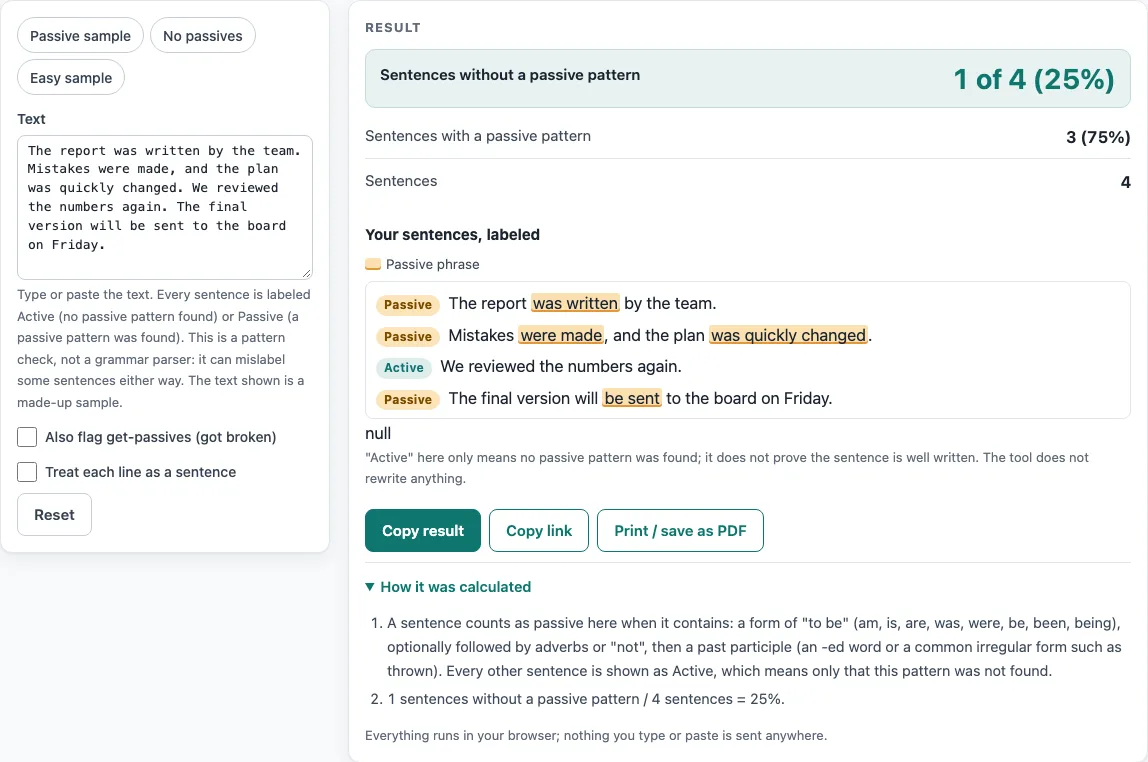
How to use the Active voice checker
- Paste your text into the Text box. The limit is 200,000 characters.
- Optional: switch on Also flag get-passives (got broken) to count “get/got + participle” phrases as passive. Both checkboxes are off by default.
- Optional: switch on Treat each line as a sentence if your text has one sentence per line, such as a list.
- Read the large figure under Sentences without a passive pattern. For the default sample, it shows “1 of 4 (25%)”.
- Check Sentences with a passive pattern and Sentences to see the other counts.
- Scroll to Your sentences, labeled. Each sentence is a numbered list item tagged Active or Passive, and the passive phrases are highlighted.
- For each Passive mark, read the sentence and decide whether it needs changing.
To try the tool first, use the presets Passive sample, No passives, or Easy sample. The list shows the first 1,500 sentences, but the counts cover all analyzed text. Use Copy result to copy the numbers as text, Copy link to copy a web address that reopens the tool with your settings, and Print / save as PDF to keep a record. Reset returns the tool to its starting sample. A very long pasted text is left out of the copied link.
How do I check for active voice?
Paste your text into the Text box. The tool gives each sentence a label, Active or Passive, and counts how many sentences contain no passive pattern.
What counts as active here?
Here, “active” means only that no passive pattern was found. A sentence is labeled Passive when it contains a form of “to be” followed by a past participle. The forms it looks for are am, is, are, was, were, be, been, and being, with optional adverbs or “not” between them and the participle. A participle is an -ed word of four or more letters or a standard irregular form such as “written”. Adjective-like words such as “tired” and “excited” are excluded. Being labeled active does not prove a sentence is well written.
Is 100% active the goal?
Not necessarily. The page names no target percentage. In active voice, the subject does the action (“The team wrote the report”). In passive voice, the subject receives it (“The report was written by the team”). Passive is sometimes the better choice, for example when the actor is unknown, unimportant, or is a law or rule. Treat the count as a way to find passive phrases to review, not as a score to maximize.
Why is a sentence marked Passive though it describes a state?
The pattern cannot tell a state from an action. “The door is closed” contains “is” followed by “closed”, so it is labeled Passive even though no one acted on the door in that sentence. Some participles used as adjectives are matched in the same way. Check each mark yourself before deciding to change the sentence.
What about “got broken”?
“Got broken” is not flagged by default. Switch on Also flag get-passives (got broken), and “get/got + participle” phrases count as passive. Turn it on when your text uses “got” passives and you want them labeled.
Can it turn passive sentences into active ones?
No. The tool does not rewrite sentences. It marks the passive phrase in the list, and you decide how to reword it, such as changing “The report was written by the team” to “The team wrote the report.”
Sources (checked 2026-10-15): Federal plain language guidelines (digital.gov).
Worked examples
| Input | Result |
|---|---|
| The report was written by the team. Mistakes were made, and the plan was quickly change... | 1 of 4 sentences without a passive pattern |
| We reviewed the numbers. The team wrote a clear report. Anna sent it to the board on Fr... | 4 of 4 sentences without a passive pattern |
| The cat sat on the mat. It was a warm day. The dog ran to the park and played with a ba... | 4 of 4 sentences without a passive pattern |
Calculated by the tool above; open it with the same values to see each step.
Frequently asked questions
Is the active voice checker free?
Yes. It is free to use, with no sign-up and no account.
Does it upload or store the text I paste?
No. Everything runs in your browser, and nothing leaves it. The site does not upload or store the text you paste.
Does it judge how well I write?
No. It counts and labels sentences only. Readability formulas measure sentence length and word or syllable length, so they cannot judge meaning, correctness, or whether a text suits a reader. Here, “Active” only means no passive pattern was found.
Why does the “No passives” preset show 100%?
The No passives preset gives “4 of 4 (100%)”, and the page includes a caution that the check can miss passives. A sentence labeled Active may still contain a passive the pattern does not know, so review your own text rather than relying on the label alone.
Does it check every sentence in a long text?
The list shows only the first 1,500 sentences, but the counts cover all analyzed text, up to 200,000 characters.
Can I check a single sentence?
Yes. Paste one sentence and the list shows it with its Active or Passive tag.
Can I share or print my result?
Copy result copies the numbers as text, Copy link copies a web address that reopens the tool with your settings, and Print / save as PDF opens your browser’s print dialog. A very long pasted text is left out of the link.
Related tools
- Passive voice checker: Use it when your main goal is to find passive sentences and see the passive phrases highlighted.
- Plain language examples and checker: Use it to compare plainer wordings of common phrases.
- Readability checker: Use it to get an overall readability estimate for your text.
- Average sentence length calculator: Use it to see how long your sentences are on average.
- Sentence counter: Use it when you only need the number of sentences in your text.
- Reading level checker: Use it to estimate the reading level of a text.