Coleman-Liau Index Calculator
Paste your text to get its Coleman-Liau index without counting syllables.
Recent
Your last 10 settings, saved only in this browser. Nothing is uploaded.
The Coleman-Liau index calculator estimates the US grade level of a text from its letter count and sentence length. Paste text into the Text to check box and the tool returns your Coleman-Liau index along with L (letters per 100 words) and S (sentences per 100 words), plus the counts behind them. It runs in your browser, is free, and needs no sign-up. The text you paste is never uploaded or stored by the site.
The formula does not count syllables, so the score depends only on letters and sentences. That makes it a quick, repeatable check of length. It cannot judge meaning, accuracy or whether a text suits a particular reader, so treat the score as a rough guide.
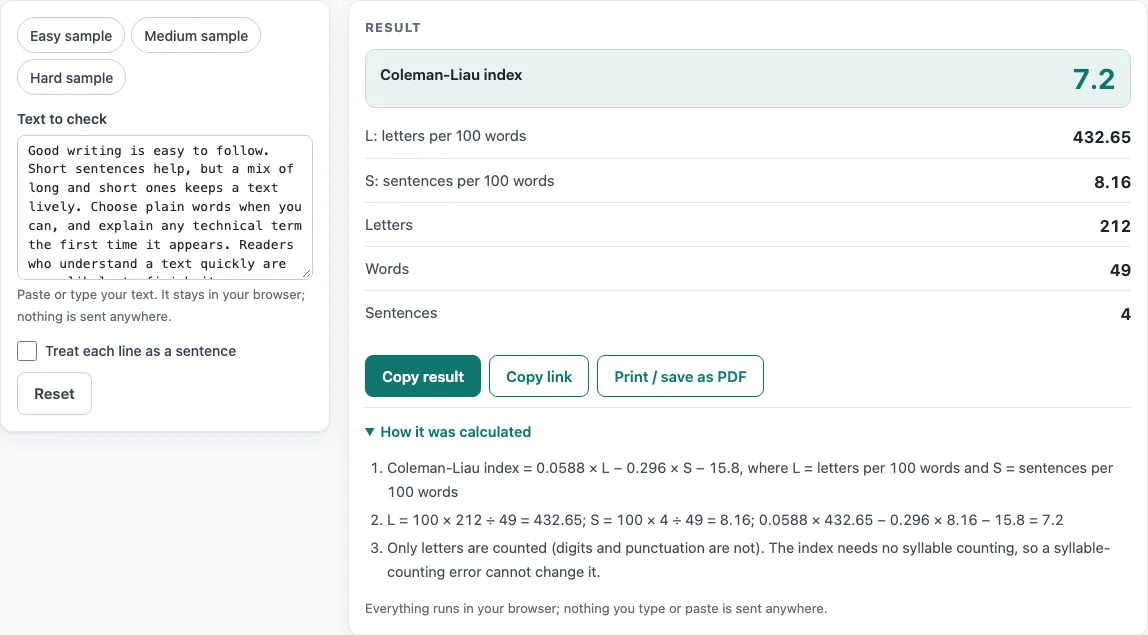
How to use the Coleman-Liau index calculator
- Paste or type your text into the Text to check box. To try the tool first, click the Easy, Medium or Hard sample chip.
- If each line is its own sentence, such as a list or a set of short lines, turn on Treat each line as a sentence. Otherwise, leave it off.
- Read the big Coleman-Liau index number. It is shown to one decimal place.
- Check L: letters per 100 words and S: sentences per 100 words to see the two inputs.
- Check Letters, Words and Sentences to confirm the tool counted your text the way you expected.
- Open the steps to see the calculation from L and S to the final score.
- Watch for warnings. Texts under 20 words or 3 sentences show a “very short text, treat as rough” warning, and text over 200,000 characters is cut.
A blank line counts as a paragraph break, and a single line break counts as a space unless Treat each line as a sentence is on. Use Copy result to copy the numbers as text, Copy link to copy a web address that reopens the tool with your settings, and Print / save as PDF to keep a record. Reset returns the tool to its starting sample. A very long pasted text is left out of the copied link.
What is the Coleman-Liau index?
The Coleman-Liau index is a US grade-level score based on how many letters a text has per word and how many sentences it has per word. It uses characters rather than syllables, which sets it apart from many other readability formulas. Higher scores mean longer words and sentences, and the result is read as a school grade level.
What is the formula?
The formula is 0.0588 × L − 0.296 × S − 15.8. L is the average number of letters per 100 words, and S is the average number of sentences per 100 words. For “The children walked to school together on Monday.” (41 letters, 8 words, 1 sentence), L is 512.50 and S is 12.50, giving a score of 10.6.
What are L and S?
L is the letters per 100 words, calculated as 100 × letters ÷ words. S is the sentences per 100 words, calculated as 100 × sentences ÷ words. Only letters are counted for L: digits and punctuation are left out, so “I have 25 apples.” has 11 letters in 4 words.
Does it count syllables?
No. The Coleman-Liau index does not use syllables at all. This is why it is not affected by the syllable-counting errors that can affect formulas such as Flesch-Kincaid. The tool’s syllable estimates are only used by other readability measures, not by this one.
Who created it?
The formula was created by M. Coleman and T. L. Liau, and published in 1975 in the paper “A computer readability formula designed for machine scoring” in the Journal of Applied Psychology. The authors designed it so a computer could score text without needing syllable counts.
Why can the result be negative?
Very short words and very short sentences push the score below zero, which means the text reads as very easy. “Dogs bark. Cats purr softly.” has 22 letters, 5 words and 2 sentences, which gives a score of −1.8. A negative result is a valid estimate, not an error.
How does it compare with Flesch-Kincaid?
Coleman-Liau and Flesch-Kincaid use different inputs. Coleman-Liau uses letters and sentences, while Flesch-Kincaid uses syllables and sentences. Because the inputs differ, the two scores for the same text will usually not match. Coleman-Liau is useful when you want a letter-based estimate that does not depend on syllable counts.
Sources (checked 2026-10-15): Coleman–Liau index (Wikipedia).
Worked examples
| Input | Result |
|---|---|
| Good writing is easy to follow. Short sentences help, but... | Coleman-Liau index 7.2 (212 letters in 49 words) |
| The cat sat on the mat. It was a warm day. The dog ran to... | Coleman-Liau index -0.8 (94 letters in 29 words) |
| Organizations frequently underestimate the administrative... | Coleman-Liau index 31.8 (266 letters in 31 words) |
Calculated by the tool above; open it with the same values to see each step.
Frequently asked questions
Is the score exact?
No. The score is an estimate of length-based reading level. It does not measure meaning, accuracy or whether a text suits a particular reader.
Does the tool store the text I paste?
No. The tool runs in your browser, and the text is never uploaded or stored by the site.
What counts as a word?
Hyphenated words such as “well-known” count as one word, and numbers such as 1,000.50 also count as one word. Abbreviations like Dr. and e.g. do not end a sentence by themselves.
Why does a short text show a warning?
Texts under 20 words or 3 sentences are too short for a stable estimate, so the tool shows a “very short text, treat as rough” warning. Add more text for a steadier result.
What happens with very long text?
Text over 200,000 characters is cut, and the tool shows a warning when this happens. Split longer documents into sections and check each one separately.
What do L and S show?
L is letters per 100 words and S is sentences per 100 words. They are the two inputs of the formula, shown so you can see what drives the score.
Can I share or print my result?
Copy result copies the numbers as text, Copy link copies a web address that reopens the tool with your settings, and Print / save as PDF opens your browser’s print dialog. A very long pasted text is left out of the link.
Related tools
- Flesch-Kincaid calculator: use this when you want a score based on syllables and sentence length.
- Gunning Fog index calculator: use this when you want a score based on sentence length and complex words.
- SMOG index calculator: use this when you want a score based on polysyllabic words.
- Automated Readability Index calculator: use this when you want a score based on characters per word and words per sentence.
- Reading level checker: use this when you want a general reading level check for a text.
- Readability formulas compared: use this when you want to see how the main formulas differ.
- Readability checker: use this to go back to the main page and check any text.