Sentence Counter
Paste your text to count its sentences, words and paragraphs.
Recent
Your last 10 settings, saved only in this browser. Nothing is uploaded.
The sentence counter counts the sentences, words, characters and paragraphs in any text you type or paste into the box. The first number shown is the sentence count, so this online sentence counter gives you the answer straight away. It runs in your browser, is free, and needs no sign-up or account.
Use it for essays, emails, scripts, song lyrics, poems or lists where you want a quick count. It also shows the average words per sentence, the longest and shortest sentence, and a table listing each sentence with its word count. The count follows fixed rules for full stops, question marks, exclamation marks and ellipses. The sections below explain those rules, so you can predict how a tricky text will be counted.
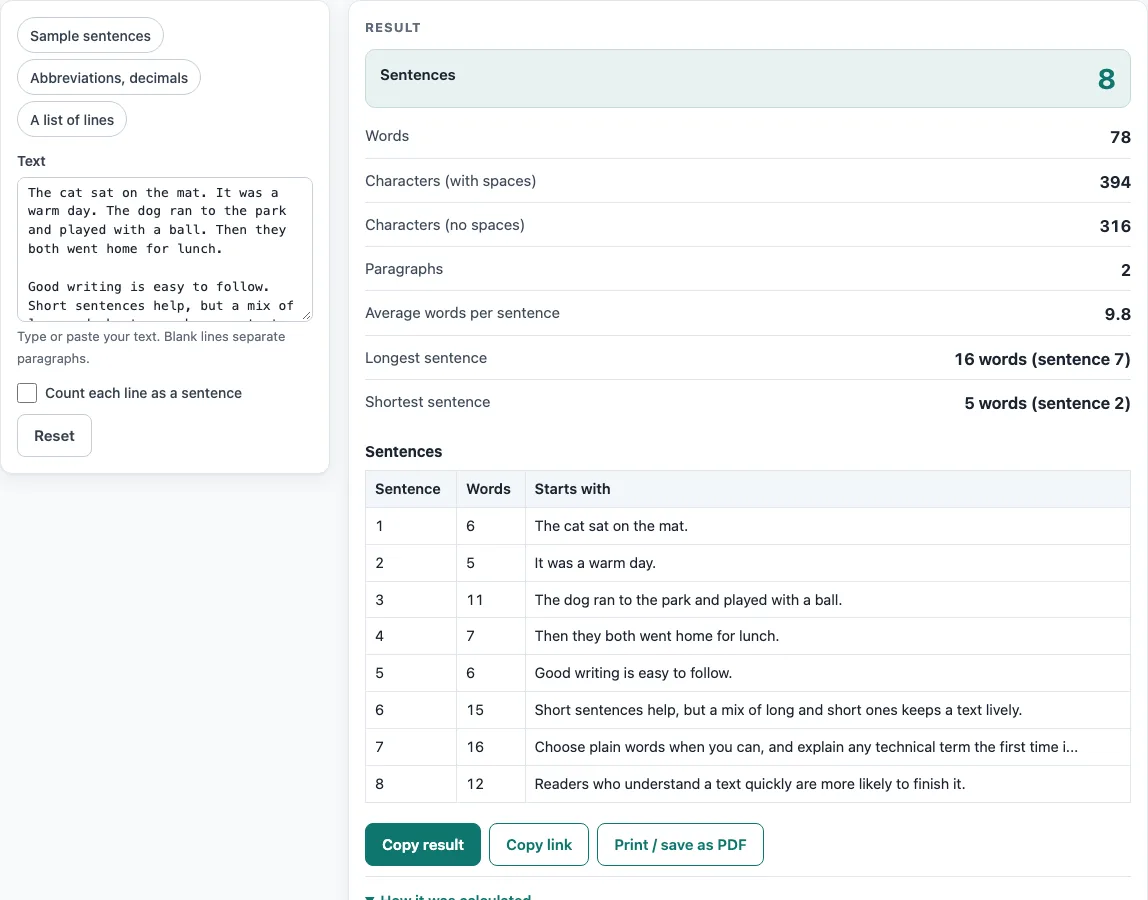
How to use the Sentence counter
- Click into the Text box and type or paste your text. Or choose a preset: Sample sentences, Abbreviations, decimals or A list of lines.
- If your text is a list, a poem, or lines without full stops, tick Count each line as a sentence.
- Read Sentences, the big number at the top of the results.
- Check Words, Characters (with spaces), Characters (no spaces) and Paragraphs for the other counts.
- Look at Average words per sentence, Longest sentence and Shortest sentence. Each one shows “N words (sentence k)”, so you can find that sentence by its number.
- Scroll to the table. It lists each sentence with its Words count and Starts with, which shows the first 80 characters. If the text has more than 500 sentences, the heading reads “first 500 of N”.
The presets are the only shortcuts. Try one first if you want to see how the counts work before pasting your own text. Text longer than 200,000 characters is cut, and a warning appears. Use Copy result to copy the numbers as text, Copy link to copy a web address that reopens the tool with your settings, and Print / save as PDF to keep a record. Reset returns the tool to its starting sample. A very long pasted text is left out of the copied link.
How do I count sentences in a text?
The sentence counter ends a sentence at a full stop, question mark, exclamation mark or ellipsis, when that mark is followed by a space or the end of the text. Closing quotes and brackets stay with the sentence they close. Text is trimmed before counting, so spaces at the start and end add nothing. An ellipsis ends a sentence only before a capital letter, a quote or the end, so “Well… Then we left.” gives 2 sentences, while “Well… then we left.” gives 1.
Does “Mr.” or “Dr.” end a sentence?
No. A full stop after these abbreviations never ends a sentence: mr, mrs, ms, dr, prof, sr, jr, st, vs, mt, e.g., i.e., a.m., p.m., cf, fig, no, approx, dept and est. The list is built in and shown on the page. A full stop after etc, inc, ltd, co, corp, and the month abbreviations ends a sentence only if a capital letter or the end follows.
What about decimals like 3.5?
A decimal point never ends a sentence, so 3.5 stays inside its sentence. A full stop followed by a lower-case word never ends a sentence either. A single-letter initial, as in “J. K. Rowling”, does not end a sentence when a capital letter follows. An abbreviation written with inner full stops, such as “U.S.”, ends a sentence only when a capital letter follows.
How do I count lines of a list as sentences?
By default, a list with no end marks is counted as one sentence, because the rules find no sentence ending. Tick Count each line as a sentence, and every non-blank line becomes one sentence, whatever it ends with. For example, “Buy milk / Call the dentist / Write the report / Walk the dog”, written on four lines, gives 1 sentence normally and 4 sentences with the checkbox on, with 11 words in total.
Does it count words and characters too?
Yes. Hyphenated words and numbers such as 1,000.50 count as one word. Abbreviations with inner full stops, such as “U.S.” and “e.g.”, count as one word each. Characters with spaces counts every character, including line breaks. Characters without spaces removes all whitespace. For “The cat sat. The dog ran home!”, the result is 2 sentences, 7 words, 30 characters, 24 without spaces, and an average of 3.5 words per sentence.
How are paragraphs counted?
A paragraph is a block of text separated from the next by a blank line. This applies whether or not the checkbox is ticked. A single line break inside a block counts as a space, so a line that wraps does not start a new paragraph.
Worked examples
| Input | Result |
|---|---|
| The cat sat on the mat. It was a warm day. The dog ran to the park and played wi | 8 sentences, 78 words |
| The cat sat on the mat. It was a warm day. The dog ran to the park and played wi | 4 sentences, 29 words |
| Dr. Smith paid 3.5 dollars for the large one. Is that fair? Mr. Jones thinks so! | 3 sentences, 16 words |
| Buy milk Call the dentist Write the report Walk the dog | 4 sentences, 11 words |
Calculated by the tool above; open it with the same values to see each step.
Frequently asked questions
Is this sentence counter accurate?
The counts follow fixed rules, so the same text always gives the same result. Some writing breaks those rules, such as headings with no end mark or dialogue. Check the table of sentences against your text, and use the checkbox for lists.
How do I count the words in one sentence?
Paste the sentence into the Text box and read the Words figure. The table also shows the Words count for each sentence, so you can compare several sentences at once.
Does this count complex sentences?
No. The tool counts sentences by their end marks. It does not check grammar or count clauses, so you need to identify complex sentences yourself.
Is there a limit on how much text I can paste?
Yes. Text beyond 200,000 characters is cut with a warning. The table shows only the first 500 sentences, and its heading shows the total as “first 500 of N”.
What does “Longest sentence” show?
It shows the word count of the longest sentence and its number, for example “9 words (sentence 1)”. Sentence numbers match the order of the table, so you can find the sentence there.
Can this tell me whether my writing is easy to read?
Not on its own. Readability formulas measure only sentence length and word or syllable length. They cannot judge meaning, correctness or whether a text suits a reader. Syllable counts come from a dictionary where the word is listed and a rule-based estimate otherwise, so scores are estimates.
Related tools
- Average sentence length calculator: use it when you only need the average number of words per sentence.
- Syllable counter: use it when you need syllable counts for words in a text.
- Readability checker: use it to see readability scores for your text.
- Readability formulas compared: read it to understand what each formula measures and where it falls short.
- Plain language examples and checker: use it to compare plain language examples with your own writing.